Friday, November 9, 2012
Moving Forward
When sailing into the wind, one must tack while never losing sight of the destination, the goal. You can do this...and though it will seem slow, the progress tenuous and exhausting, you're getting there! You're moving closer. Keep your eyes on the finish and never lose sight of the person you are and the people you'll help along the way.


Saturday, October 27, 2012
Share a Photo Stream?
First, why on earth would a person want to share a stream of photos? I did ask myself this as I'm a bit of a perfectionist when it comes to photos - not wanting to post anything until I've had my way in tweaking color, levels, cropping and what not. I'm fighting against this though - as the sharing is more important than how "perfect" they look - and after all, it's an iPhone photo. It's not like I'm contracted by National Geographic and shooting scenes of bear cubs in Alaska :-).
Shared Photo Streams are there to share life as it happens with one person or more, or even the general public. Going on a once in a lifetime vacation or if your business is having a special event - Shared Photo Streams allow you to share, without having to post on Facebook or Twitter or having to email.
So, how does one create a shared Photo Stream? It's easy.
First, in your iPhone or iPad, open your Photos app and press "Photo Stream" as shown below. then click the "+" sign to add a stream.

Next, in the "To:" line, add the email addresses you'd like to share the Stream with. Then in the next line, Name the Stream and then select whether you want this to be public or not.

Easy as pie.
How would you use a shared Photo Stream?
Friday, March 30, 2012
Spring Cleaning Facebook Apps and Websites using your iPhone
If you're like me, you add apps to Facebook to give more usefulness to the website. The problem is that these apps always come with some privacy caveats. To review and control what apps you load when Facebook is running, follow these steps with your iPhone.
First, open the Facebook app and click on the box with the three parallel lines.
You'll get a screen like this...scroll down to the bottom to see the "Settings" area and press down.

 Then click on "Account Settings" and you'll see this screen.
Click on "Apps and Websites" and the screen will then display all of those that you've given approval over the months or years.

Click the app you think you might want to get rid of...

First, open the Facebook app and click on the box with the three parallel lines.
You'll get a screen like this...scroll down to the bottom to see the "Settings" area and press down.


Click on "Apps and Websites" and the screen will then display all of those that you've given approval over the months or years.

Click the app you think you might want to get rid of...
At the top you'll see the option to remove the application. Under that button several pieces of information is displayed.

I really don't think this information is shared to do any harm - but it is good for you to know, to be aware of, the information you're sending out to the world - and to have control over it. As you can see from my Pandora App - Facebook is reporting that they haven't accessed my information in about a year.
Friday, March 23, 2012
The new iPad and interface design
The advent of extremely high resolution screens, like the new iPad, should change the way we create User Interface (UI) graphics for all of our computing devices.
Here's the issue: Historically the higher the resolution, the smaller text and photos appear on the screen. This happens because most graphics and interface elements we create for computers are raster types, meaning they're based on individual pixels and not inches. So if an element on our screen is, let's say, 100 pixels in height, on a very old 8" high screen with a resolution of 600 x 400, that icon will take 1/4 or 2" of the screen height. But, if you were to take the same sized screen and make it 2000 x 1000, that same icon, because the screen has a much higher pixel per inch (ppi), will take-up only 0.8" or 1/10th of the screen height. So, what's the problem? Our population is older and as we age, our eyes weaken, making these smaller elements more difficult to read and causing eye strain for those of us lucky enough to work on computers.
Solution? We need to start creating operating system and application UIs that are based on actual size versus pixel size. We can do this by making the switch from raster graphics to vector graphics. Vector graphics scale infinitely so no matter how small or big they are on the screen, the edges are smooth, crisp and easy to read.
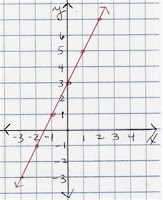 Besides readability, there's another big benefit for making the switch to vector graphics: download sizes. As raster graphics have to include all color and position data for each and every pixel, as their size increases the amount of data increases. This is not so with Vector graphics, as a vector is, in simple terms, a line between two points - and because we're talking about a 2 dimensional screen, only two coordinate values are needed for each point...Remember the graphs you did for algebra class in high school.
Another reason for switching to vector graphics based on actual size on a screen, is the touch interface so many of us are now used to when using our iPhones, iPads, Android and other devices. Our fingers, within a limited range of measure, are similar in size and need a certain amount of space to operate. No matter the screen size and resolution, we need an actual and fairly consistent area for buttons. Currently operating systems decrease the physical size of buttons as resolution increases (given that the screen size is constant). Not a problem with a mouse or pen - but a big problem for fingers.
Having all of this screen real estate is wonderful, but if text and icons are too small to read, and buttons too tiny to push, these beautiful screens become useless.
Here's the issue: Historically the higher the resolution, the smaller text and photos appear on the screen. This happens because most graphics and interface elements we create for computers are raster types, meaning they're based on individual pixels and not inches. So if an element on our screen is, let's say, 100 pixels in height, on a very old 8" high screen with a resolution of 600 x 400, that icon will take 1/4 or 2" of the screen height. But, if you were to take the same sized screen and make it 2000 x 1000, that same icon, because the screen has a much higher pixel per inch (ppi), will take-up only 0.8" or 1/10th of the screen height. So, what's the problem? Our population is older and as we age, our eyes weaken, making these smaller elements more difficult to read and causing eye strain for those of us lucky enough to work on computers.
Solution? We need to start creating operating system and application UIs that are based on actual size versus pixel size. We can do this by making the switch from raster graphics to vector graphics. Vector graphics scale infinitely so no matter how small or big they are on the screen, the edges are smooth, crisp and easy to read.
 Besides readability, there's another big benefit for making the switch to vector graphics: download sizes. As raster graphics have to include all color and position data for each and every pixel, as their size increases the amount of data increases. This is not so with Vector graphics, as a vector is, in simple terms, a line between two points - and because we're talking about a 2 dimensional screen, only two coordinate values are needed for each point...Remember the graphs you did for algebra class in high school.
Another reason for switching to vector graphics based on actual size on a screen, is the touch interface so many of us are now used to when using our iPhones, iPads, Android and other devices. Our fingers, within a limited range of measure, are similar in size and need a certain amount of space to operate. No matter the screen size and resolution, we need an actual and fairly consistent area for buttons. Currently operating systems decrease the physical size of buttons as resolution increases (given that the screen size is constant). Not a problem with a mouse or pen - but a big problem for fingers.
Having all of this screen real estate is wonderful, but if text and icons are too small to read, and buttons too tiny to push, these beautiful screens become useless.
Monday, March 12, 2012
The Yeti, by Blue Mic
 From phone calls using Google and Skype, to voice overs on animation projects, I really love using Blue Mic's Yeti USB microphone. Clean sound, easy set-up and a lot of control.
The mic features fully adjustable gain control, a mute button (seen in the photo), and a headphone jack, so that monitoring is live - a volume control is also provided for that jack. In addition, "The Yeti features Blue's innovative triple capsule array, allowing for recording in stereo or your choice of three unique patterns, including cardioid, omnidirectional, and bidirectional, giving you recording capabilities usually requiring multiple microphones."
If you have a recording to make - and need a very good mic at a very reasonable cost, the Yeti is the way to go. Love this thing.
http://www.bluemic.com/yeti/
Subscribe to:
Posts (Atom)